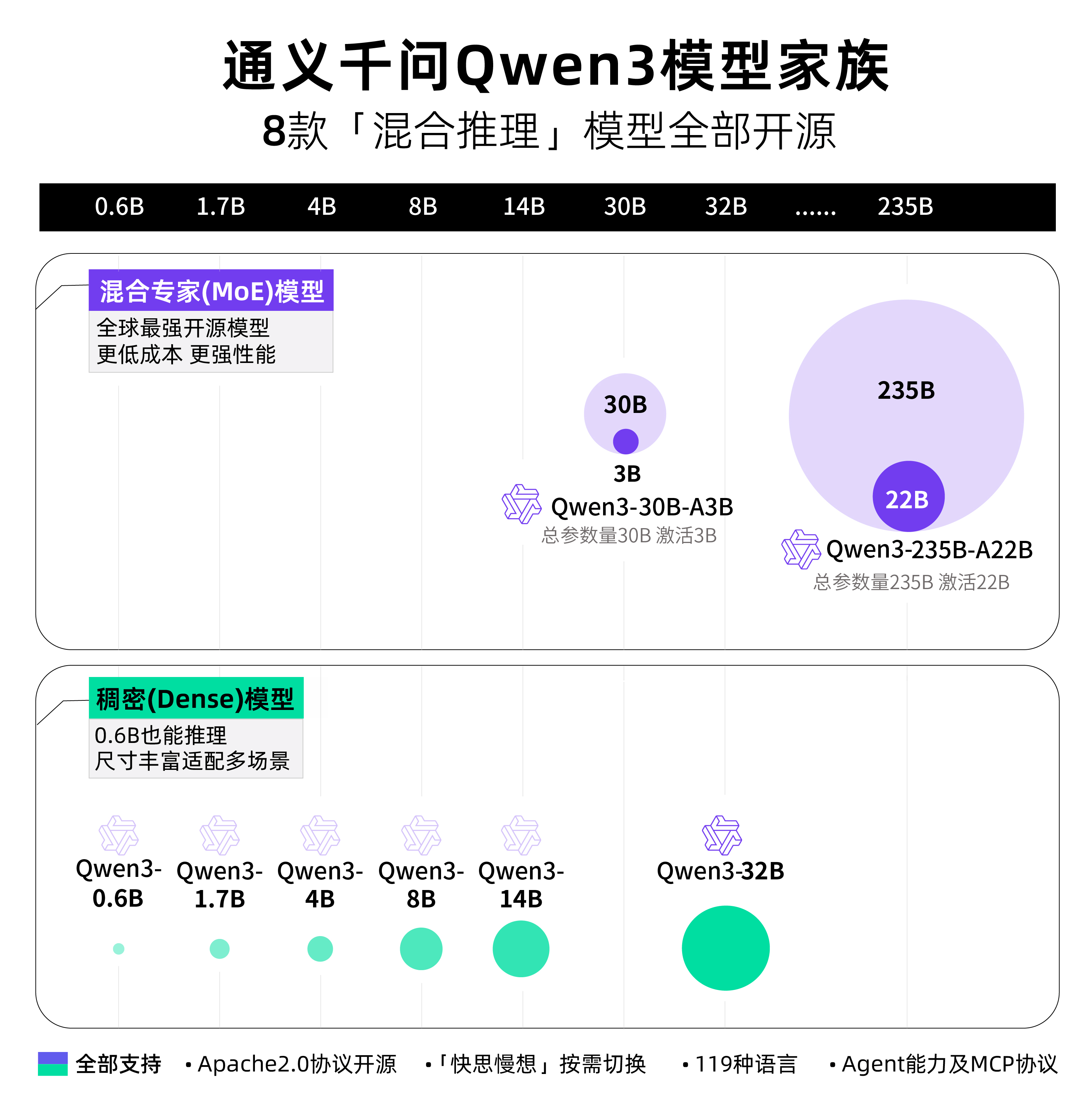
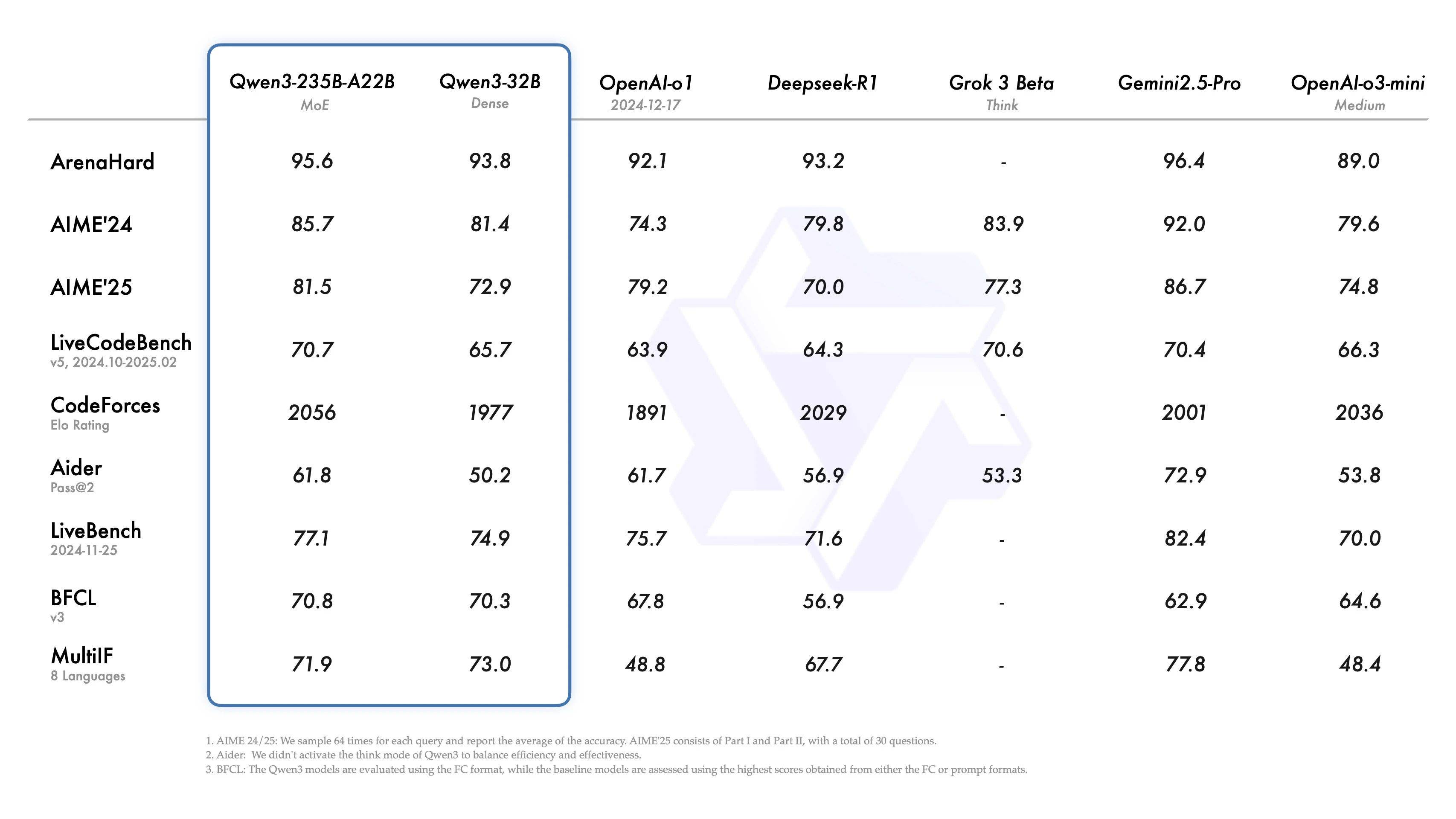
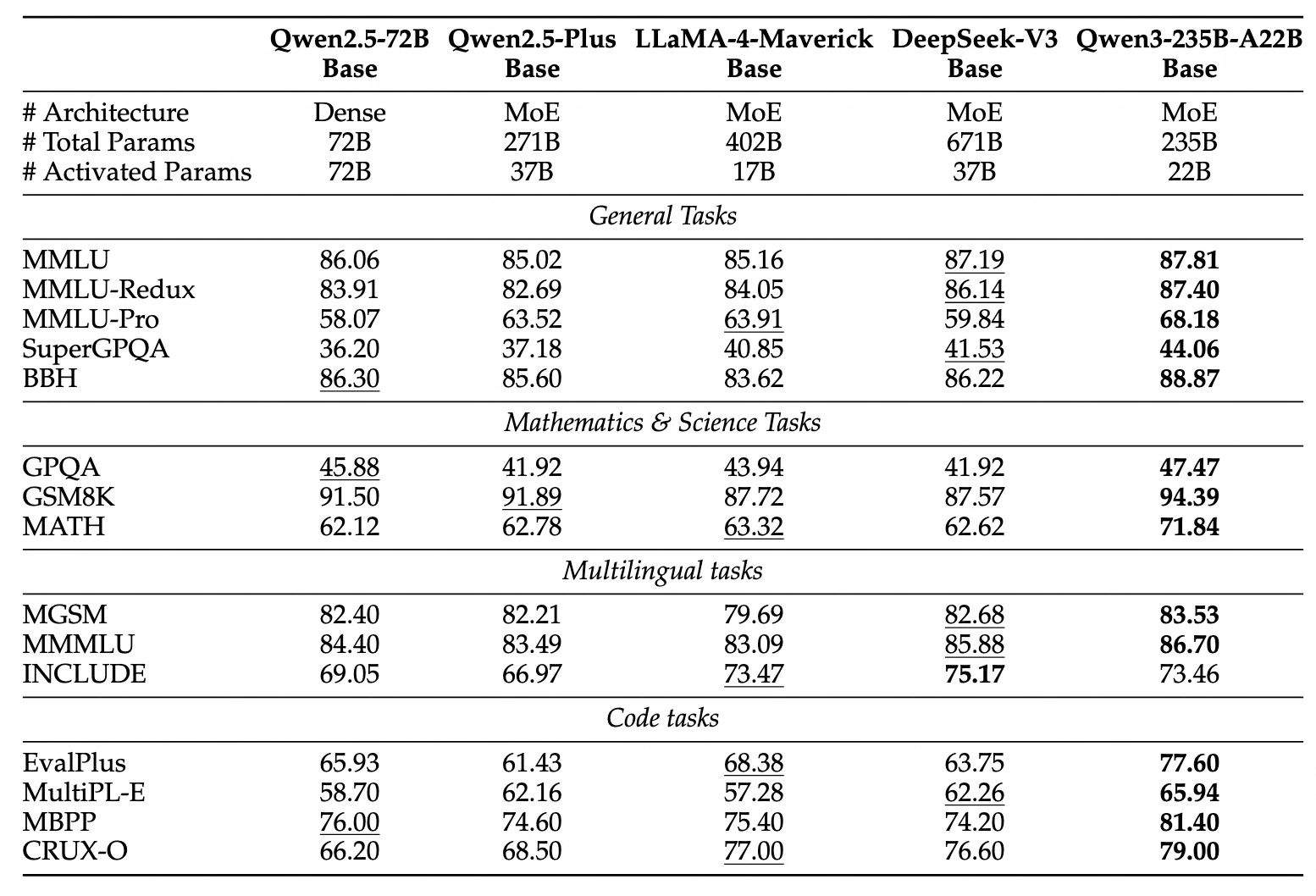
- 旗舰模型Qwen3-235B-A22B在代码、数学、通用能力等基准测试中,与一众顶级模型相比,表现出极具竞争力的结果。
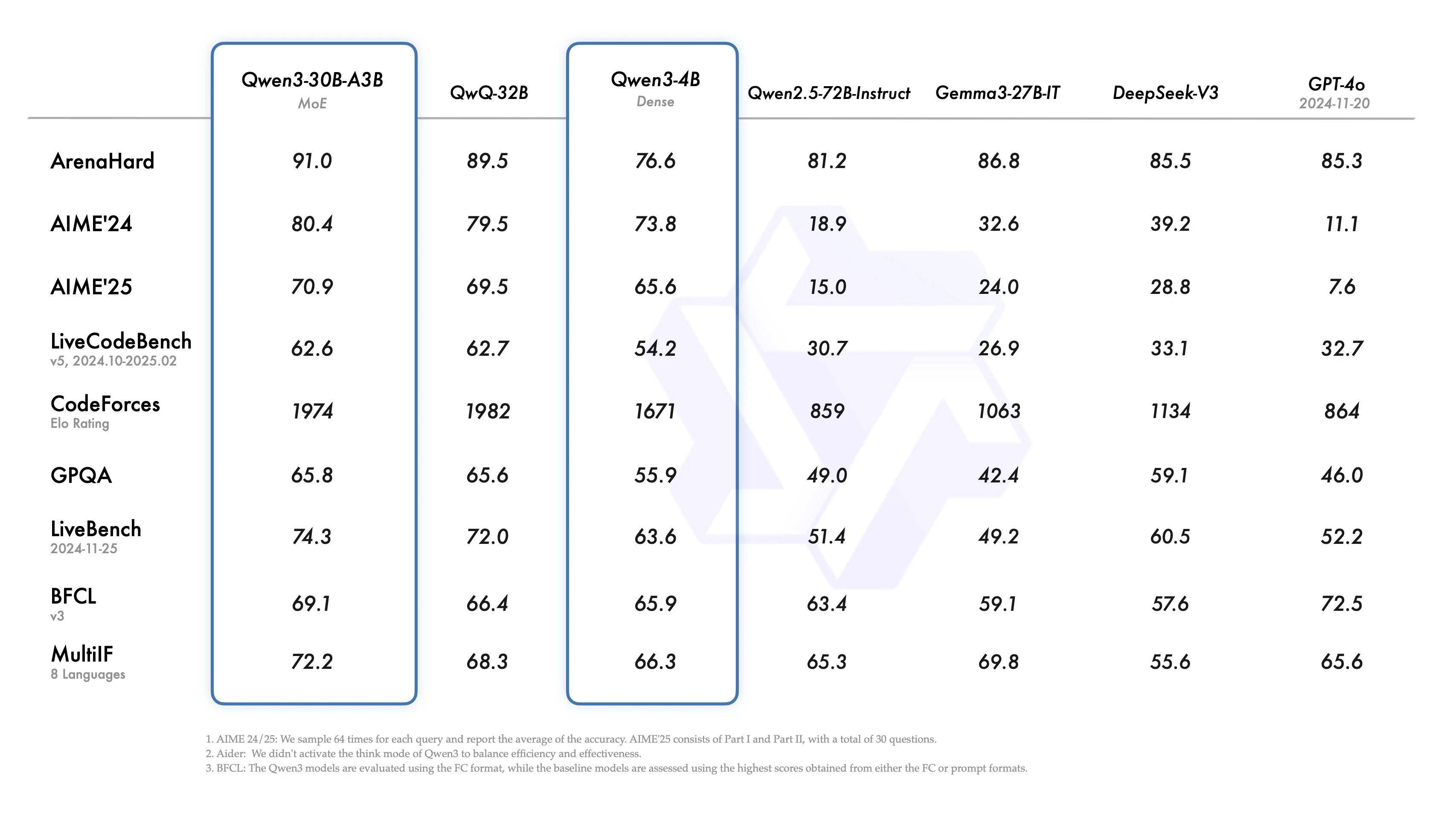
- 小型MoE模型Qwen3-30B-A3B的激活参数数量是QwQ-32B10%,表现更胜一筹, Qwen3-4B 这样的小模型也能匹敌 Qwen2.5-72B-Instruct 的性能。
- GitHub:https://github.com/QwenLM/Qwen3
- Hugging Face:https://huggingface.co/collections/Qwen/qwen3-67dd247413f0e2e4f653967f
- 魔搭社区:https://modelscope.cn/collections/Qwen3-9743180bdc6b48
2. 非思考模式:在此模式中,模型提供快速、近乎即时的响应,适用于那些对速度要求高于深度的简单问题。
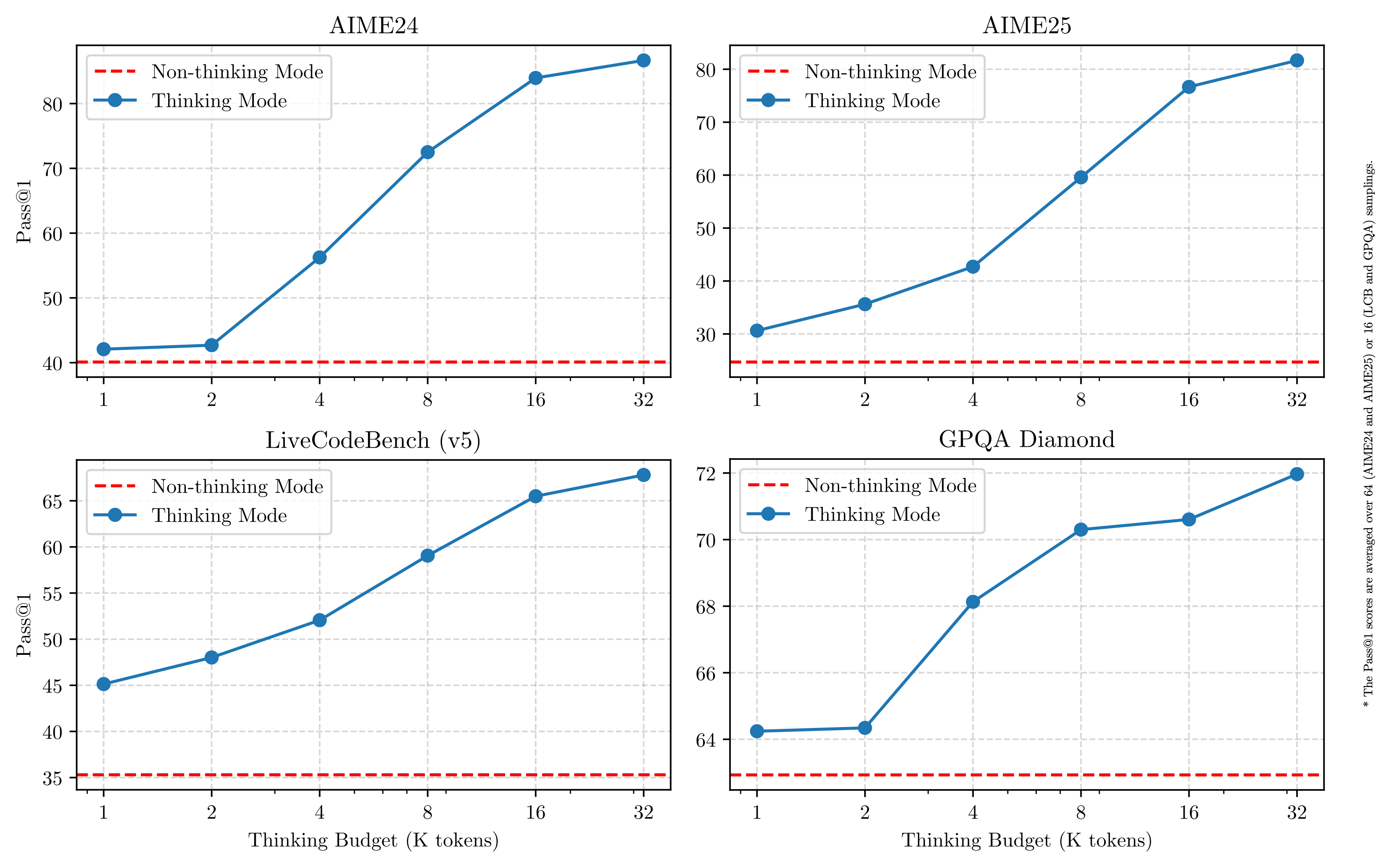
这种灵活性使用户能够根据具体任务控制模型进行“思考”的程度。例如,复杂的问题可以通过扩展推理步骤来解决,而简单的问题则可以直接快速作答,无需延迟。至关重要的是,这两种模式的结合大大增强了模型实现稳定且高效的“思考预算”控制能力。如上文所述,Qwen3 展现出可扩展且平滑的性能提升,这与分配的计算推理预算直接相关。这样的设计让用户能够更轻松地为不同任务配置特定的预算,在成本效益和推理质量之间实现更优的平衡。
多语言
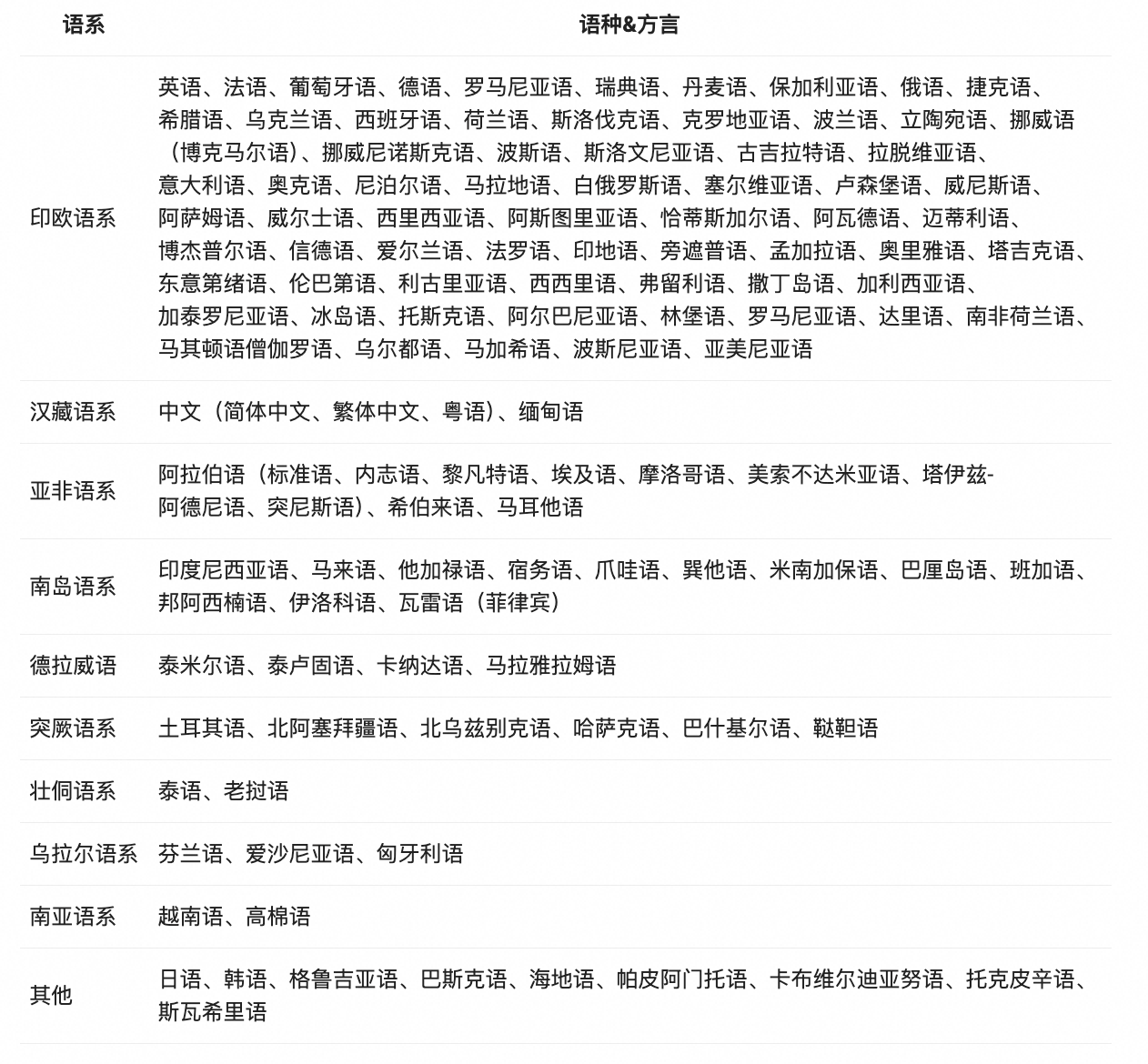
Qwen3 模型支持 119 种语言和方言。这一广泛的多语言能力为国际应用开辟了新的可能性,让全球用户都能受益于这些模型的强大功能。
增强的 Agent 能力
我们优化了 Qwen3 模型的 Agent 和 代码能力,同时也加强了对 MCP 的支持。下面我们将提供一些示例,展示 Qwen3 是如何思考并与环境进行交互的。
在预训练方面,Qwen3 的数据集相比 Qwen2.5 有了显著扩展。Qwen2.5是在 18 万亿个 token 上进行预训练的,而 Qwen3 使用的数据量几乎是其两倍,达到了约 36 万亿个 token,涵盖了 119 种语言和方言。为了构建这个庞大的数据集,我们不仅从网络上收集数据,还从 PDF 文档中提取信息。我们使用 Qwen2.5-VL 从这些文档中提取文本,并用 Qwen2.5 改进提取内容的质量。为了增加数学和代码数据的数量,我们利用 Qwen2.5-Math 和 Qwen2.5-Coder 这两个数学和代码领域的专家模型合成数据,合成了包括教科书、问答对以及代码片段等多种形式的数据。
以下是如何在不同框架中使用 Qwen3 的简单指南。首先,我们提供了一个在 Hugging Face `transformers` 中使用 Qwen3-30B-A3B 的标准示例:
from modelscope import AutoModelForCausalLM, AutoTokenizermodel_name = "Qwen/Qwen3-30B-A3B"# load the tokenizer and the modeltokenizer = AutoTokenizer.from_pretrained(model_name)model = AutoModelForCausalLM.from_pretrained(model_name,torch_dtype="auto",device_map="auto")# prepare the model inputprompt = "Give me a short introduction to large language model."messages = [{"role": "user", "content": prompt}]text = tokenizer.apply_chat_template(messages,tokenize=False,add_generation_prompt=True,enable_thinking=True # Switch between thinking and non-thinking modes. Default is True.)model_inputs = tokenizer([text], return_tensors="pt").to(model.device)# conduct text completiongenerated_ids = model.generate(**model_inputs,max_new_tokens=32768)output_ids = generated_ids[0][len(model_inputs.input_ids[0]):].tolist()# parsing thinking contenttry:# rindex finding 151668 (</think>)index = len(output_ids) - output_ids[::-1].index(151668)except ValueError:index = 0thinking_content = tokenizer.decode(output_ids[:index], skip_special_tokens=True).strip("\n")content = tokenizer.decode(output_ids[index:], skip_special_tokens=True).strip("\n")print("thinking content:", thinking_content)print("content:", content)
要禁用思考模式,只需对参数 enable_thinking 进行如下修改:
text = tokenizer.apply_chat_template(messages,tokenize=False,add_generation_prompt=True,enable_thinking=False # True is the default value for enable_thinking.)
对于部署,您可以使用 sglang>=0.4.6.post1 或 vllm>=0.8.4 来创建一个与 OpenAI API 兼容的 API endpoint:
- SGLang:
python -m sglang.launch_server --model-path Qwen/Qwen3-30B-A3B --reasoning-parser qwen3- vLLM:
vllm serve Qwen/Qwen3-30B-A3B --enable-reasoning --reasoning-parser deepseek_r1要禁用思考模式,您可以移除参数 –reasoning-parser(以及 –enable-reasoning)。
如果用于本地开发,您可以通过运行简单的命令 ollama run qwen3:30b-a3b 来使用ollama 与模型进行交互。您也可以使用 LMStudio 或者 llama.cpp 以及 ktransformers 等代码库进行本地开发。
高级用法
我们提供了一种软切换机制,允许用户在 enable_thinking=True 时动态控制模型的行为。具体来说,您可以在用户提示或系统消息中添加 /think 和 /no_think 来逐轮切换模型的思考模式。在多轮对话中,模型会遵循最近的指令。
以下是一个多轮对话的示例:
from transformers import AutoModelForCausalLM, AutoTokenizerclass QwenChatbot:def __init__(self, model_name="Qwen3-30B-A3B/Qwen3-30B-A3B"):self.tokenizer = AutoTokenizer.from_pretrained(model_name)self.model = AutoModelForCausalLM.from_pretrained(model_name)self.history = []def generate_response(self, user_input):messages = self.history + [{"role": "user", "content": user_input}]text = self.tokenizer.apply_chat_template(messages,tokenize=False,add_generation_prompt=True)inputs = self.tokenizer(text, return_tensors="pt")response_ids = self.model.generate(**inputs, max_new_tokens=32768)[0][len(inputs.input_ids[0]):].tolist()response = self.tokenizer.decode(response_ids, skip_special_tokens=True)# Update historyself.history.append({"role": "user", "content": user_input})self.history.append({"role": "assistant", "content": response})return response# Example Usageif __name__ == "__main__":chatbot = QwenChatbot()# First input (without /think or /no_think tags, thinking mode is enabled by default)user_input_1 = "How many r's in strawberries?"print(f"User: {user_input_1}")response_1 = chatbot.generate_response(user_input_1)print(f"Bot: {response_1}")print("----------------------")# Second input with /no_thinkuser_input_2 = "Then, how many r's in blueberries? /no_think"print(f"User: {user_input_2}")response_2 = chatbot.generate_response(user_input_2)print(f"Bot: {response_2}")print("----------------------")# Third input with /thinkuser_input_3 = "Really? /think"print(f"User: {user_input_3}")response_3 = chatbot.generate_response(user_input_3)print(f"Bot: {response_3}")
Agent 示例
Qwen3 在工具调用能力方面表现出色。我们推荐使用 Qwen-Agent 来充分发挥 Qwen3 的 Agent 能力。Qwen-Agent 内部封装了工具调用模板和工具调用解析器,大大降低了代码复杂性。
要定义可用的工具,您可以使用 MCP 配置文件,使用 Qwen-Agent 内置的工具,或者自行集成其他工具。
from qwen_agent.agents import Assistant# Define LLMllm_cfg = {'model': 'Qwen3-30B-A3B',# Use the endpoint provided by Alibaba Model Studio:# 'model_type': 'qwen_dashscope',# 'api_key': os.getenv('DASHSCOPE_API_KEY'),# Use a custom endpoint compatible with OpenAI API:'model_server': 'http://localhost:8000/v1', # api_base'api_key': 'EMPTY',# Other parameters:# 'generate_cfg': {# # Add: When the response content is `<think>this is the thought</think>this is the answer;# # Do not add: When the response has been separated by reasoning_content and content.# 'thought_in_content': True,# },}# Define Toolstools = [{'mcpServers': { # You can specify the MCP configuration file'time': {'command': 'uvx','args': ['mcp-server-time', '--local-timezone=Asia/Shanghai']},"fetch": {"command": "uvx","args": ["mcp-server-fetch"]}}},'code_interpreter', # Built-in tools]# Define Agentbot = Assistant(llm=llm_cfg, function_list=tools)# Streaming generationmessages = [{'role': 'user', 'content': 'https://qwenlm.github.io/blog/ Introduce the latest developments of Qwen'}]for responses in bot.run(messages=messages):passprint(responses)
© 版权声明
文章版权归作者所有,未经允许请勿转载。
相关文章


暂无评论...
 UIED学习平台